
Pass with professional CKAD actual quiz materials

Choosing our Linux Foundation CKAD study material, choosing success. Choosing us, choosing high efficiency!
Last Updated: Nov 26, 2026
No. of Questions: 239 Questions & Answers with Testing Engine
Latest Version: V13.95
Download Limit: Unlimited
The professional and latest CKAD actual quiz materials with high-quality core knownledge help you pass exam easily!
Choosing ActualTestsQuiz CKAD actual quiz materials, Pass exam one-shot. The core knowledge of our CKAD actual test torrent is compiled based on the latest real questions and similiar with the real test. Also we provide simulation function to help you prepare better. You will feel the real test type and questions style, so that you will feel casual while in the real test after preparing with our CKAD actual quiz materials.
100% Money Back Guarantee
ActualTestsQuiz has an unprecedented 99.6% first time pass rate among our customers.  We're so confident of our products that we provide no hassle product exchange.
- Best exam practice material
- Three formats are optional
- 10 years of excellence
- 365 Days Free Updates
- Learn anywhere, anytime
- 100% Safe shopping experience
- Instant Download: Our system will send you the products you purchase in mailbox in a minute after payment. (If not received within 12 hours, please contact us. Note: don't forget to check your spam.)
Linux Foundation CKAD Practice Q&A's

- Printable CKAD PDF Format
- Prepared by CKAD Experts
- Instant Access to Download
- Study Anywhere, Anytime
- 365 Days Free Updates
- Free CKAD PDF Demo Available
- Download Q&A's Demo
Linux Foundation CKAD Online Engine

- Online Tool, Convenient, easy to study.
- Instant Online Access
- Supports All Web Browsers
- Practice Online Anytime
- Test History and Performance Review
- Supports Windows / Mac / Android / iOS, etc.
- Try Online Engine Demo
Linux Foundation CKAD Self Test Engine

- Installable Software Application
- Simulates Real Exam Environment
- Builds CKAD Exam Confidence
- Supports MS Operating System
- Two Modes For Practice
- Practice Offline Anytime
- Software Screenshots
Exam content drifts, and small knowledge gaps compound. In 2026, ActualTestsQuiz experts review and refresh the CKAD materials continuously, and updates reach you free for 365 days after purchase.
Linux Foundation CKAD Exam Syllabus Topics:
| Section | Weight | Objectives |
|---|---|---|
| Application Environment, Configuration and Security | 25% | - Understanding and defining resource requirements, limits and quotas - SecurityContexts - Understand authentication, authorization and admission control - Discover and use resources that extend Kubernetes (CRD, Operators) - ConfigMaps and Secrets - ServiceAccounts |
| Services and Networking | 20% | - Provide and troubleshoot access to applications via services - Demonstrate basic understanding of NetworkPolicies - Use Ingress rules to expose applications |
| Application Deployment | 20% | - Kustomize - Use the Helm package manager to deploy existing packages - Use Kubernetes primitives to implement common deployment strategies (e.g., blue/green or canary) - Understand Deployments and how to perform rolling updates |
| Application Design and Build | 20% | - Define, build and modify container images - Utilize persistent and ephemeral volumes - Understand multi-container Pod design patterns (e.g., sidecar, init and others) - Choose and use the right workload resource (Deployment, DaemonSet, CronJob, etc.) |
| Application Observability and Maintenance | 15% | - Use built-in CLI tools to monitor Kubernetes applications - Implement probes and health checks - Utilize container logs - Debugging in Kubernetes - Understand API deprecation policies |
Linux Foundation Certified Kubernetes Application Developer Exam: Try It, Then Trust It
The Linux Foundation Certified Kubernetes Application Developer exam contains 15-20 (performance-based tasks) to complete within 120 minutes. Timed simulation in the ActualTestsQuiz Desktop Test Engine teaches that rhythm before exam day does.
Online, proctored exam via PSI Secure Browser (performance-based in a command-line environment). Register for the Linux Foundation Certified Kubernetes Application Developer exam through these official channels:
After booking, ActualTestsQuiz delivers your practice questions within 1 minute — preparation starts the same day.
ActualTestsQuiz issues a full refund if you take the Linux Foundation Certified Kubernetes Application Developer exam within 60 days of purchase and do not pass. The policy does not apply if the exam is taken within 3 days of purchase, if the exam was never actually taken, or to free materials or expired orders, and the candidate name must match the payer name. Submit a scan of your enrollment slip and the official Score Report PDF within 2 days of the exam; claims are processed within 7 days. Alternatively, exchange for two free exam products of equal value and keep your original update service. Orders arrive by email within 1 minute — contact support if nothing arrives within 2 hours.
The CKAD exam is a Linux Foundation certification exam validating the Linux Foundation Certified Kubernetes Application Developer syllabus shown above. It belongs to these credential paths: Certified Kubernetes Application Developer (CKAD). Candidates in 2026 start with ActualTestsQuiz's 239 practice questions, available as a printable PDF, a Windows Desktop Test Engine, and an Online Test Engine — three versions of the same materials.
The official Linux Foundation Certified Kubernetes Application Developer outline defines 5 domains. The leading three are Application Observability and Maintenance (15%), Application Environment, Configuration and Security (25%), and Application Deployment (20%). The full list is in the topics section above, and ActualTestsQuiz's 239 practice questions cover each one.
No mandatory prerequisites, but working knowledge of container runtimes and microservice architecture is recommended. Since requirements change over time, confirm the latest on the official Linux Foundation exam page before scheduling.
Linux Foundation recommends these training resources for the Linux Foundation Certified Kubernetes Application Developer exam:
Follow the training with steady self-testing — the 239 practice questions from ActualTestsQuiz help you apply theory and fill any gaps the training leaves.
The Linux Foundation Certified Kubernetes Application Developer exam requires 66% to pass, and registration costs USD 445. A failed attempt means paying the same fee again — a readiness check with the ActualTestsQuiz engines before booking is the cheaper option.
Three versions of the same study materials: a printable, expert-prepared PDF with free demo download and instant access; a Desktop Test Engine for Windows with customizable simulation and timed modes that works offline; and an Online Test Engine for any browser on Windows, Mac, Android, and iOS with test history and performance review. All 239 practice questions are identical across versions. Every purchase includes 365 days of free updates, a 50% renewal discount afterward, and unlimited computer installations.
Linux Foundation Certified Kubernetes Application Developer Sample Questions:
You have a Deployment named 'bookstore-deployment which deploys a Bookstore application, utilizing a PostgreSQL database. The deployment has 3 replicas. The database server is managed externally. The application is built With a feature to dynamically resize its replica count based on the load- You need to implement a strategy to automatically adjust the replica count to between 2 and 5, based on the CPU utilization of the pods. This should happen without manual intervention.
Reveal Solution Discussion 0Correct Answer:
See the solution below with Step by Step Explanation.
Explanation:
Solution (Step by Step) :
1. Create a Horizontal Pod Autoscaler (HPA):
- use the 'kubectl create hpa' command to create an HPA named 'bookstore-hpa'
- Set the 'minRepIicas' to 2 and 'maxRepIic.as' to 5, defining the desired range of replicas.
- Set the 'targetCPlJLJtilizationPercentage' to 70, meaning the replica count will adjust when the average CPU utilization ot the pods crosses 70%.
- Specify the selector to match the 'bookstore-deployment' pods.
2. Apply the HPA: - Run 'kubectl apply -f bookstore-hpa.yamr to create the HPA. 3. Verify the HPA: - Check the status of the HPA using 'kubectl get hpa bookstore-hpa' 4. Observe Replica Adjustment: - Increase the load on the bookstore application to trigger the HPA scaling. - Monitor the replica count of the bookstore-deployment' using 'kL1bectl get deployments bookstore-deployment. You will observe the replica count automatically adjusting based on the CPL] utilization- 5. Customize Scaling Parameters: - You can customize the 'targetCPLJlJtilizationPercentage', 'minReplicas', and 'maxReplicaS in the HPA definition based on the application requirements and desired benavior.
Context
An existing web application must be exposed externally.
You must connect to the correct host . Failure to do so may result in a zero score.
[candidate@base] $ ssh ckad00025
An application externally using the URL external.sterling-bengal.local . Any requests starting with / must be routed to the application web-app.
To test the web application's external reachability, run
[candidate@ckad00025]
$ curl http://external.sterling-bengal.local/
or open this URL in the remote desktop's browser.
Correct Answer:
See the Explanation below for complete solution.
Explanation:
ssh ckad00025
You need to expose the existing app "web-app" externally at:
* Host: external.sterling-bengal.local
* Path: / (and anything starting with /) # route to web-app
In CKAD labs, this is almost always done with an Ingress pointing to the Service web-app.
1) Find where web-app Service lives (namespace + port)
kubectl get svc -A | grep -w web-app
You'll get something like:
<NAMESPACE> web-app ClusterIP ... <PORT>/TCP
Set the namespace:
NS=<NAMESPACE>
Check the service port(s):
kubectl -n $NS get svc web-app -o yaml
Note the service port number (commonly 80).
Also verify it has endpoints (so it actually routes to pods):
kubectl -n $NS get endpoints web-app -o wide
If endpoints are empty, the Service selector doesn't match pods - tell me and I'll give the exact fix. But usually it's fine.
2) Create the Ingress to route / to web-app
Create a manifest (use the service port you saw; I'll assume 80 below):
cat <<'EOF' > web-app-ingress.yaml
apiVersion: networking.k8s.io/v1
kind: Ingress
metadata:
name: web-app-ingress
spec:
rules:
- host: external.sterling-bengal.local
http:
paths:
- path: /
pathType: Prefix
backend:
service:
name: web-app
port:
number: 80
EOF
Apply it:
kubectl -n $NS apply -f web-app-ingress.yaml
Verify:
kubectl -n $NS get ingress web-app-ingress
kubectl -n $NS describe ingress web-app-ingress
If your Service port is not 80, change number: 80 to the correct value and re-apply.
3) Test external reachability (as instructed)
Run exactly:
curl
-i http://external.sterling-bengal.local/
If curl still fails (quick checks)
A) Is there an ingress controller running?
kubectl get pods -A | egrep -i 'ingress|nginx'
kubectl get svc -A | egrep -i 'ingress|nginx'
B) Does Ingress show an address?
kubectl -n $NS get ingress web-app-ingress -o wide
C) Do we have endpoints?
kubectl -n $NS get endpoints web-app -o wide
You need to configure a PodSecurityPolicy to restrict tne capabilities of pods running in your Kubernetes cluster. You want to create a policy that allows pods to use only specific capabilities and prevent them from accessing host resources.
Reveal Solution Discussion 0Correct Answer:
See the solution below with Step by Step Explanation.
Explanation:
Solution (Step by Step) :
1. Create a P0dSecurityP01icy:
- Create a PodSecurityPolicy YAML configuration file: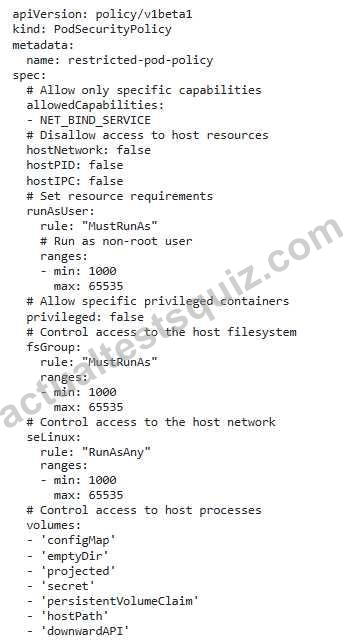
2. Apply the PodSecurityPolicy: - Apply the PodSecurityPolicy configuration to your Kubernetes cluster: basn kubectl apply -f restricted-pod-policy-yaml 3. Bind the Policy to ServiceAccount: - Create a RoleBinding or ClusterRoleBinding to bind the PodSecurityPolicy to a specific ServiceAccount or all users. - For example, to bind it to a ServiceAccount:
4. Test tne Policy: - Create a pod using the ServiceAccount that has the PodSecurityPolicy applied. - Verify that tne pod cannot access host resources or use unauthorized capabilities.
You have a Deployment running a web application that is scaling dynamically based on traffic. However, the application occasionally experiences Slow response times during peak traffic periods. You suspect that the pods are being scheduled on nodes that are already under pressure. To improve the performance, you want to implement node affinity, ensuring that pods are scheduled on nodes with specific labels that indicate high resources and low utilization.
Reveal Solution Discussion 0Correct Answer:
See the solution below with Step by Step Explanation.
Explanation:
Solution (Step by Step) :
1. Define Node Labels:
- Identify nodes with high resources and low utilization.
- Label these nodes with a specific label like 'high-resource':
bash
kubectl label nodes node-name high-resource=true
2. Configure Node Affinity in Deployment
- Update tne Deployment YAML to include node affinity rules.
- preferredDuringSchedulinglgnoredDuringExecution: This affinity rule indicates a preference for scheduling pods on nodes with specific labels. It doesn't prevent scheduling on other nodes if preferred nodes are unavailable.
3. Apply the Deployment Configuration: - Apply the updated Deployment configuration to your Kubernetes cluster: bash kubectl apply -f my-web-app-deployment.yaml 4. Monitor Pod Scheduling: - Use 'kubectl get pods -l app=my-web-app' to monitor the pod scheduling. - Verity that the pods are being scheduled on nodes with the 'high-resource' label.
You nave a multi-container pod tnat uses a database container and an application container. The database container is responsible for storing sensitive datm You need to ensure that the database container only runs on nodes that have a specific label, like 'sensitive-data=true', for added security. How would you implement this constraint using Pod Affinity and node selectors?
Reveal Solution Discussion 0Correct Answer:
See the solution below with Step by Step Explanation.
Explanation:
Solution (Step by Step) :
1. Define Node Labels:
- First, you need to label your nodes appropriately. I-Jse ' kubectl label nodes sensitive-data=true' for nodes that should host the database container
2. Create Pod Affinity Rules:
- In your pod definition, add a 'nodeselector' to enforce the requirement.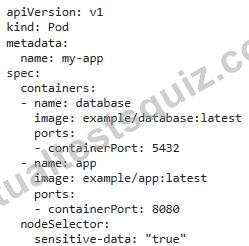
3. Apply the Pod Definition: - Apply the updated pod definition using 'kubectl apply -f my-app-yaml' 4. Verification: - Check the pod status using 'kubectl get pods my-app'. Ensure the pod is scheduled on a node with the 'sensitive-data-true label. 5. Further Security: - You can additionally use 'podAffinity' to ensure that the database container and the application container run on different nodes. This adds an extra layer of security in case one node is compromised.
- In this example, 'podAntiAtfinitys Witn 'requiredDuringScnedulinglgnoredDunngExecution' ensures tnat tne database container and tne application container are not scheduled on the same node, thus preventing potential data breaches. ,
Viewing page 1 out of 48 pages.
Viewing questions 1-5 out of 239 questions.
Over 67295+ Satisfied Customers

 Daphne
Freda
Joanna
Maria
Olive
Sheila
ActualTestsQuiz is the world's largest certification preparation company with 99.6% Pass Rate History from 67295+ Satisfied Customers in 148 Countries.

Our Clients


With our veteran experience in this career, we can claim that you can pass your exam as easy as pie by studying with our splendid exam materials for 20 to 30 hours. More and more candidates have obtained their expected certification with our help. So will you.
Contact Us
From Monday to Saturday
Support: Contact now
If you have any question please leave me your email address, we will reply and send email to you in 12 hours.
Copyright © 2026 ACTUALTESTSQUIZ.COM. All rights reserved. All trademarks are the property of their respective owners and we don't provide actual questions from any vendor. Privacy Policy